Windows 11 Notepad is one of the few default apps I like. It opens fast, keeps tabs, and does not ask me to create a project before I can type a sentence. I wanted that same window on Linux as one native binary, with no Electron, GTK, Qt or web view behind it. I called the project Elevenpad, started on 2 November, and wrote it in Rust with egui and eframe.
By 3 November it was 17 commits, about 3,600 lines in src, and 15 tagged releases from 0.2.0 to 0.4.9. The text editor was the easy half. egui already has a multiline TextEdit, so the work went into the frame: a title bar, tab strip, menu bar, status bar and two file dialogs that I drew myself, because matching the Windows 11 app matters more than being another generic Linux editor.
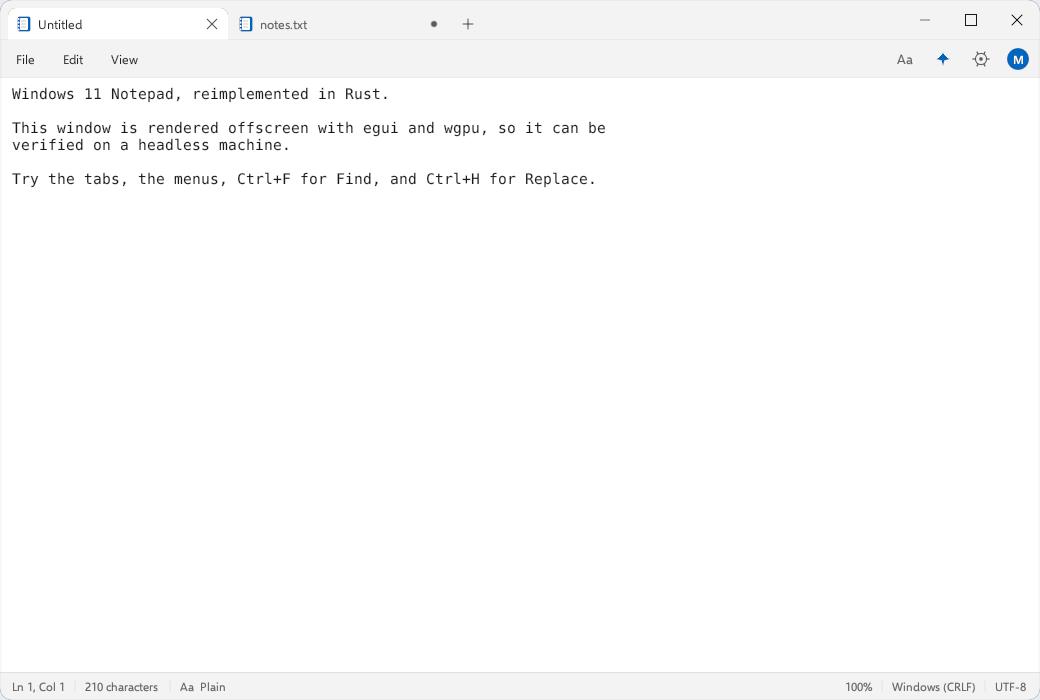
The light theme, drawn offscreen by shot.rs on a machine with no display.
The frame is the app
The window is created with decorations off and a transparent surface, so every pixel of chrome, including the caption buttons and the 6 px band that resizes the window, is egui drawing. Most of the bugs came from that.
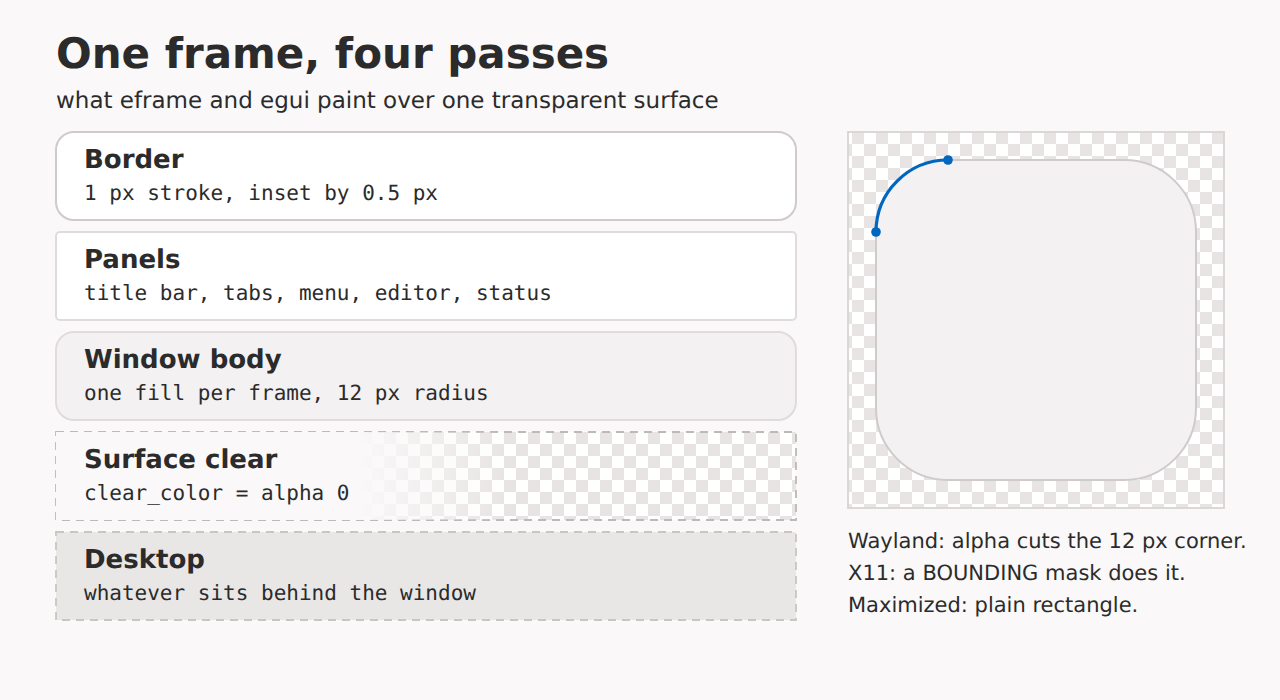
Four passes over a transparent surface. The border is a stroke inset by half a pixel.
Transparency did nothing at first. eframe clears each frame with rgba(12, 12, 12, 180) before any app code runs, so a dark wash sat under my panels and the corners looked dirty instead of cut out. clear_color now returns transparent when rounded corners are on, and the palette window colour when they are off. Fixing that exposed a second problem: at fractional scaling factors the panels leave a subpixel gap between them, and a transparent clear showed a 1 px line of desktop through the middle of the window. The app now paints the window body once into the background layer, rounded, before any panel draws on top.
The border left a black band on X11. I stroked a 1 px frame on the window edge, which puts half the stroke outside the opaque fill, and without a compositing manager that half pixel rendered black. The stroke is now inset by half a pixel. Rounded corners default to on only when WAYLAND_DISPLAY is set, since plain X11 cannot do them with alpha, and the View menu can switch them either way.
Plain X11 needed the window actually cut. src/shape.rs is about 150 lines that use the X Shape extension through x11rb: find the app window by _NET_WM_PID, fall back to WM_CLASS containing “elevenpad”, draw a filled polygon into a 1 bit pixmap (nine points per corner), and apply it as the BOUNDING shape. A maximized window gets a plain rectangle. Each apply opens its own X connection and walks the root window’s children on a background thread, so it runs only after a size change of more than a pixel, at most every 0.15 seconds, and only one at a time behind an AtomicBool. Windows can disappear mid-walk, so those errors are dropped. On Wayland the whole thing returns early and the compositor uses the alpha channel.
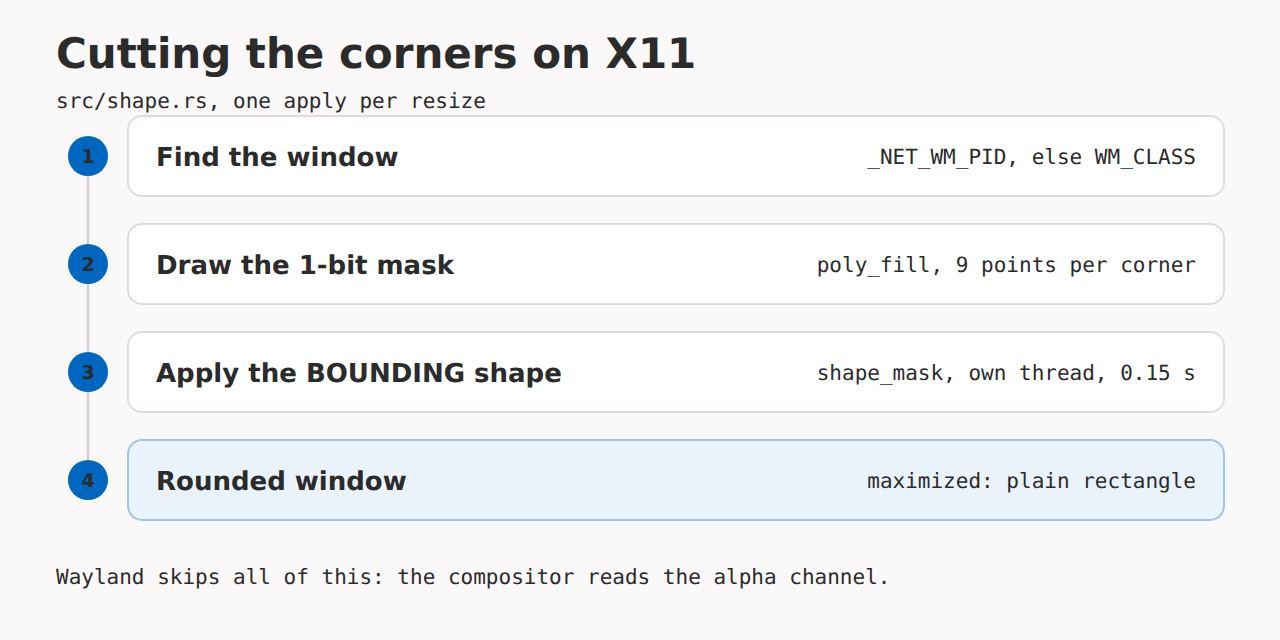
What shape.rs does, once per resize. None of it runs on Wayland.
Since there are no decorations, the last problem was resizing. native_resize hit tests a 6 px band inside each edge every frame, sends BeginResize, and then removes the pointer press from the event queue so the widget underneath the border does not also react to it. Without that, the widget under the border would see the press as well.
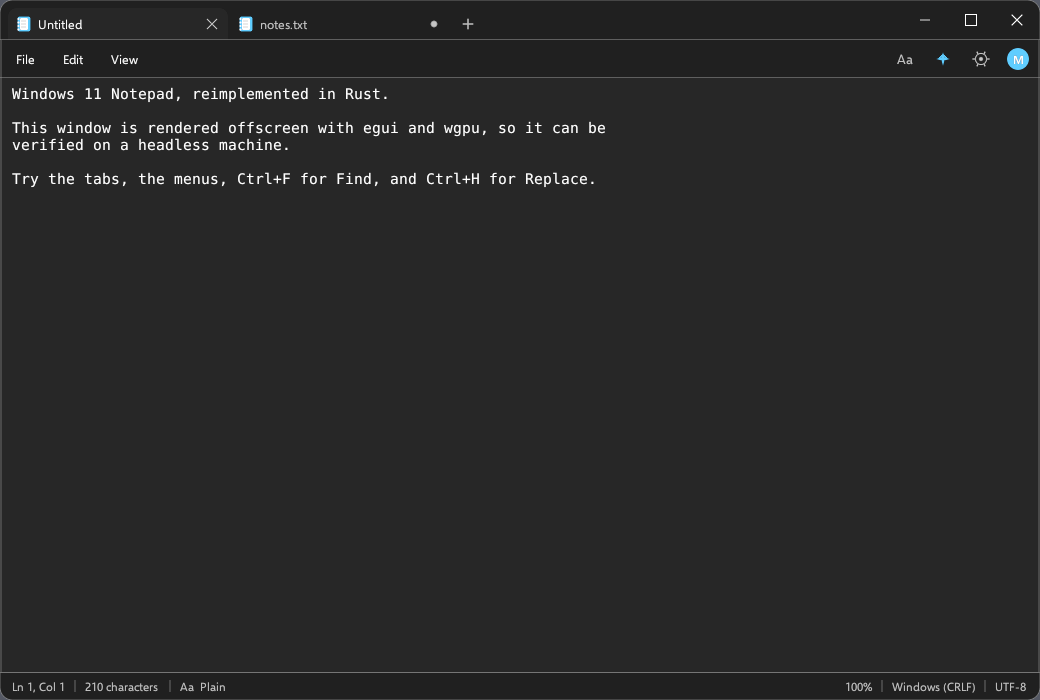
The same frame in the dark palette.
The renderer chose itself
The first builds ran wgpu on Vulkan. Dragging the window edge under Wayland on an NVIDIA driver, the content lagged behind the pointer and jumped to the new size when I let go. The same code through glow, eframe’s OpenGL backend, resized smoothly. OpenGL is the default now, —wgpu opts back into Vulkan, and a failed GL context does not exit the app:
match launch(preferred, files.clone(), transparent) {
    Ok(()) => Ok(()),
    Err(error) if !use_wgpu => {
        eprintln!("OpenGL renderer failed ({error}); falling back to wgpu");
        launch(eframe::Renderer::Wgpu, files, transparent)
    }
    Err(error) => Err(error),
}
That re-enters run_native rather than swapping the renderer in place. It is not elegant, but it works, and the flag survives packaging.
The lag had a second cause. Resize events arrive coalesced, so the compositor kept stretching the last frame. The app now requests repaints for 350 ms after any size change and, during that window, lays the text out plain with no syntax pass. The tokenizer turned out to be the expensive part of the frame.
src/syntax.rs is a hand written scanner over bytes, not a parser. Comments go first, then strings, numbers and identifiers, one pass per layout, no dependencies, and it falls back to plain text above 300 KB. Rust gets a special case: an apostrophe can start a char literal or a lifetime, so it counts as a literal only when a closing quote turns up within the next five bytes. An identifier followed by a parenthesis is a function, a leading uppercase word is a type, and the keyword tables cover 13 languages. JSON keys take the function colour when the next non space byte is a colon. It is not a real highlighter, but it runs inside the layout callback on every keystroke, and the plain fallback during a resize is why the window still tracks the pointer.
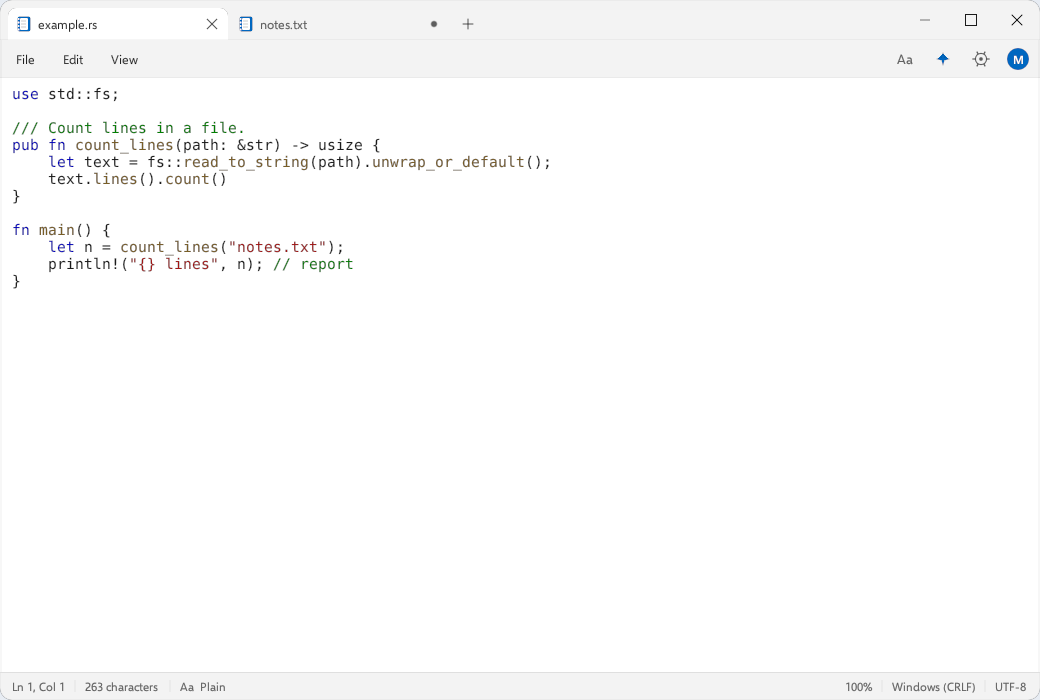
Rust highlighting, no parser and no tree-sitter.
Two smaller bugs came from the same morning. Hover was computed from the pointer position instead of egui’s interaction layering, so the close button vanished just as the pointer reached it. And the dark palette built translucent colours with from_rgba_premultiplied and full RGB values, which is an invalid premultiplied colour, so hovered menu entries came out as solid white blobs. Switching those to from_rgba_unmultiplied fixed it.
Testing a window without a window
The build machine has no display, so I could not look at the app there while building it. That produced two extra binaries.
src/bin/shot.rs runs the whole UI inside an egui::Context with a fake 1040 by 700 viewport, sends synthetic hover, press, click and resize events, tessellates the output, and renders it with egui_wgpu into an offscreen texture on Vulkan, which on a headless box means lavapipe. It copies the texture back through a buffer, respecting COPY_BYTES_PER_ROW_ALIGNMENT (rows are padded to 256 bytes and stripped again), and writes a PNG. Flags pick the state: —dark, —find, —syntax, —save-dialog, —rows, —hover-at=x,y, —press-at=x,y, —resize-test. The screenshots in the README come from this binary, and —resize-test prints the viewport commands, which is how I checked that BeginResize fires from the border band without a compositor.
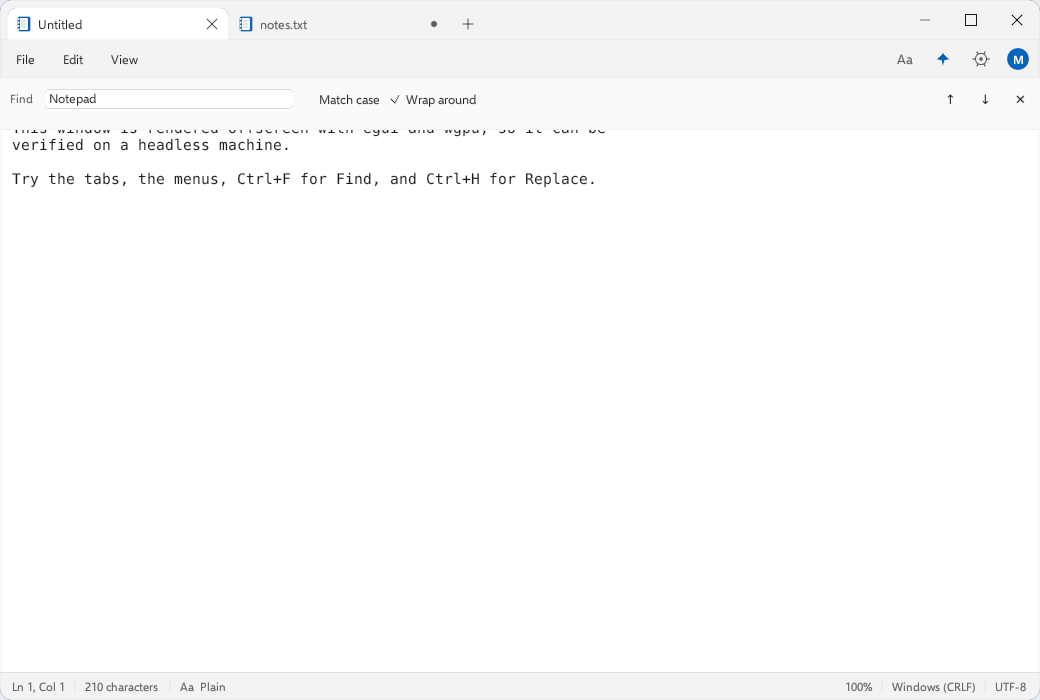
The find bar, one of the states shot.rs can render without a display.
Drawing is not the same as interaction, so src/bin/probe.rs clicks three points in the editor and one in the tab strip, then prints which egui id ends up focused. It also presses three positions on the tab strip, two empty and one on a tab, and prints the viewport commands for each so I could see where StartDrag is requested. The same probe checks that list_dir hides dot entries by default and that clear_color really does return alpha zero when rounded corners are on.
The document model has three tests of its own: a CRLF round trip that reads one\r\ntwo\r\n, appends a line and compares the bytes after saving, line and column conversion for go to line, and undo then redo.
What is still rough
Distribution. The prebuilt binary needs glibc 2.39, so Ubuntu 24.04, Fedora 40, Debian 13 or newer, and an older distro has to build from source. The AppImage needs FUSE 2 unless it is started with —appimage-extract-and-run. It is x86_64 only, about 6.5 MB, next to a 6.1 MB tarball, built by a script that assembles an AppDir, strips the binary, writes the .desktop file and calls appimagetool. There is no deb, Flatpak or AUR package.
Editing. Undo keeps full copies of the text and stops at 200 entries, so memory grows with the document rather than the edit. Highlighting switches off above 300 KB. Files are read as lossy UTF-8 with no encoding picker, which is a real gap for a Windows replacement. The file dialogs are drawn in the app instead of using the desktop portal, so they do not know about bookmarks, recent files or GVFS mounts. Copilot, rewrite, spell check and the formatting toolbar are visible but stubbed, and print is disabled.
What exists is the part I actually use. It opens from the file manager, keeps tabs, has find and replace, preserves CRLF and the BOM on save, and draws a rounded window that looks like the one I left behind, from a single binary with no toolkit underneath. Code is on GitHub: https://github.com/tobioffice/elevenpad