NbkristQik is a Telegram bot I run for students at NBKRIST. Send a roll number and it replies with attendance, mid-term marks and a bunk plan that says how many classes you can skip and still stay above 75 percent. Until 15 November the attendance answer was one HTML message: a monospaced table and ten block characters standing in for a bar.
That day I moved the attendance, marks and bunk cards to Bot API rich messages. A rich message takes HTML-like blocks, real tables, a footer and an image reference, and it reads like a card instead of a wall of preformatted text. The tables were the easy part. The bar took the next seven hours.
Why the card needed a picture
The bot has two attendance formatters for the same numbers. formatAttendanceMessage builds a <pre> table with padded columns, which is what a client without rich support still gets. formatAttendanceRich builds <table bordered striped compact> and a list of <p> blocks. The subject cells are computed twice, once per path, but the pass mark, the percentage helper and the date formatter are shared.
Rich messages do not allow inline SVG. The comment at the top of src/services/attendanceBar.ts says so, and it rules out the easy version of the bar. An image is allowed, but only through a media entry attached to the message. The HTML carries <img src="tg://photo?id=attendance-bar" alt="Attendance 82.50%"/>, and the same message uploads a PNG under the id attendance-bar.
A second constraint was about when a rich message is allowed. The Bot API accepts rich content on edit, not on a new send. A fresh card goes out as a placeholder, the numbers are fetched, and the same message is edited into the rich version. fetchAndEditText tries the rich edit first, falls back to a plain-text edit, and sends a new plain message if the edit itself fails. The action buttons are merged into every attempt, because a formatting failure should not leave the student on a dead card.
The ten-dot meter stayed as the text fallback: filled for the rounded percentage, empty for the rest. It renders in every client. For the rich card I wanted the real thing.
Drawing a PNG without an image library
The service has no image dependency, and I kept it that way. renderAttendanceBarPng is about 190 lines of TypeScript that write a PNG from scratch.
The canvas is 640 by 64. The bar is 18 pixels tall, centred at row 23, with a 9 pixel radius. The buffer is 640 * 64 * 4 bytes of RGBA. The background is filled first, then the track, then the fill. roundedRect walks every pixel and tests the corners with dx * dx + dy * dy <= r * r, which is enough at this size. The fill width is Math.round((640 * percentage) / 100), with a floor of BAR_HEIGHT so a low percentage still ends in a round cap. A two pixel red line sits at Math.round((640 * target) / 100), which is x=480 for the 75 percent target.
The encoding is the part I had not written before. A PNG is a signature, an IHDR chunk, an IDAT chunk and an IEND chunk. Each row needs a filter byte in front, so the raw buffer is (640 * 4 + 1) * 64 bytes. deflateSync compresses it at level 9, and a small CRC32 table covers each chunk. The table is built once at module load, 256 entries, with the reflected 0xedb88320 polynomial.
return Buffer.concat([
  Buffer.from([137, 80, 78, 71, 13, 10, 26, 10]),
  pngChunk("IHDR", ihdr),
  pngChunk("IDAT", deflateSync(raw, { level: 9 })),
  pngChunk("IEND", Buffer.alloc(0)),
]);
The IHDR says 8 bit depth, colour type 6, no interlace. The four tests in tests/unit/attendanceBar.test.ts check the signature, the 640 by 64 dimensions, that a different percentage produces different bytes, and that an invalid colour falls back to the dark strip. The dark 82.5 percent strip is 456 bytes. The file stays small because it is a few rectangles and a raw buffer run through deflate.

The actual PNG the bot uploads at 82.5 percent. The red tick is the 75 percent line.
What Telegram did to it
The first version served the PNG from a signed /bar/attendance.png endpoint and put the URL in the image tag. Telegram rejected it twice: once because the rich message had no media entry, and once because the image was 640 by 18, a 35:1 photo. The bar was too wide and too short for the photo pipeline.
The fix was to stop using a URL. The rich message now uploads the bytes as an InputFile under the id attendance-bar, and the HTML points at tg://photo?id=attendance-bar. The public endpoint and its signing code are gone. The image is 640 by 64, which is 10:1, and Telegram never fetches anything.
Then the padding became the problem. The 640 by 64 canvas had transparent space above and below the 18 pixel bar. Telegram flattens transparency to white in a rich photo, so the card showed a white band around the strip.
I tried a 640 by 40 canvas with the bar filling the height and a solid track. That removed the padding, but it created a worse result. Telegram renders a very wide photo in a full media frame with a blurred backdrop, and the green fill dominated the image. The bar became a green block around a white strip. I put the ten-cell text meter back for the next commit.
The version that survived is the 64 pixel canvas again, with one change: the background is painted, not transparent. DARK is #1b2733, the Telegram dark chat colour. There is no alpha for the pipeline to flatten, and the strip blends into a dark chat. On a light chat it is a dark strip, which is why the next commit had to involve the Mini App.
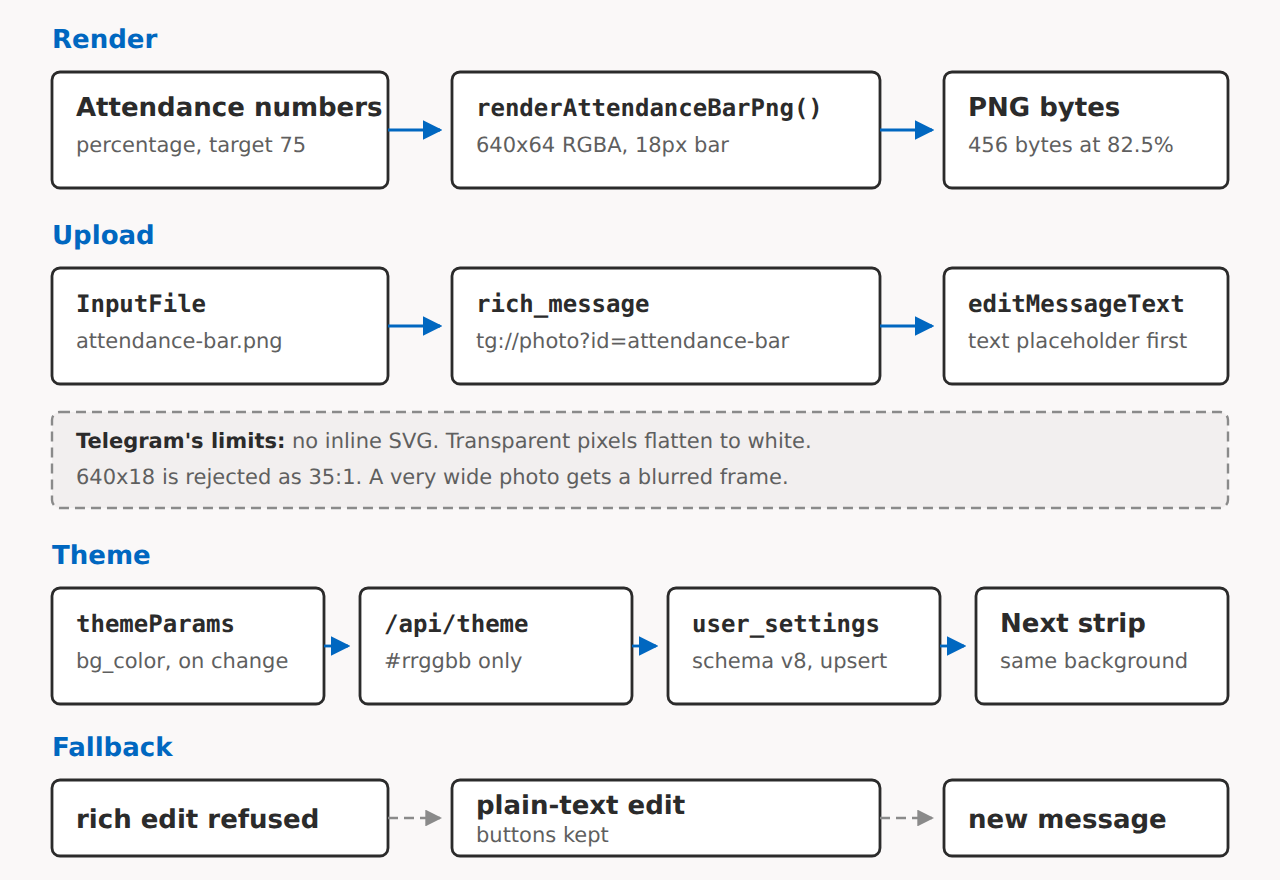
The card path and the three places it can fall back. The theme lane is the fix that came next.
The theme handshake
The Mini App already knows the chat palette. Telegram’s WebApp SDK exposes themeParams.bg_color and colorScheme, and src/web/src/AppShell.tsx calls syncTheme() when the app opens and again on the themeChanged event. The effect has empty dependencies, so the listener is registered once and removed when the shell unmounts.
syncTheme posts the colour to /api/theme. The route checks #rrggbb, rejects anything else with a 400, and upserts the value into user_settings. That table arrived in schema version 8 with userId, theme_bg, color_scheme and updated_at. getUserTheme returns null when the table is missing or the query fails, and the renderer falls back to DARK. A theme lookup should never cost a student an attendance card.
formatAttendanceRich takes the background as an optional second argument and passes it to renderAttendanceBarPng. The parser accepts six hex digits with or without the hash, and anything else returns null. With #ffffff the track reads as light grey and the amber fill still stands out. A student at 64.2 percent gets the bar below.

The same renderer at 64.2 percent with the light background reported by the Mini App.
Two limits are left. A student who has never opened the Mini App has no row in user_settings, so the first card is the dark strip even on a light phone. Telegram can also use a patterned chat background; the bot receives one colour, so the strip is a solid block on a pattern. The text meter and the Mini App remain the theme-aware fallbacks for both cases.
The tests now cover the image path as well as the card. attendanceBar.test.ts has the four PNG cases, and the commit that added the edge-path tests reports 75.69 percent branch coverage, above the 75 percent gate. Attendance is still answered in the chat, and the register still opens in the Mini App. The bar is now a real image in the card.
The code is on GitHub: https://github.com/tobioffice/NbkristQik